Studio & Tools · Design · on the bench
Multipics
Sixteen presets compose finished multi-photo blends on their own. No layer control, no undo, PNG only, and our copy could not show a blend.
Scorecard · 13 of 20 checks met
How the checks workAll four: bundled photographs and your own files; no relay, no key.
Missed C2 and C3: our evidence shows no limit or doubtful figure stated to the reader.
Missed P2 and P3: no photographs locally, so no composition could be rendered.
Missed F3 (optional music streams from soundhelix.com) and F4 (photographs load from the site).
Missed R3: no layer control, masks or video, which the comparators offer.
01What it is
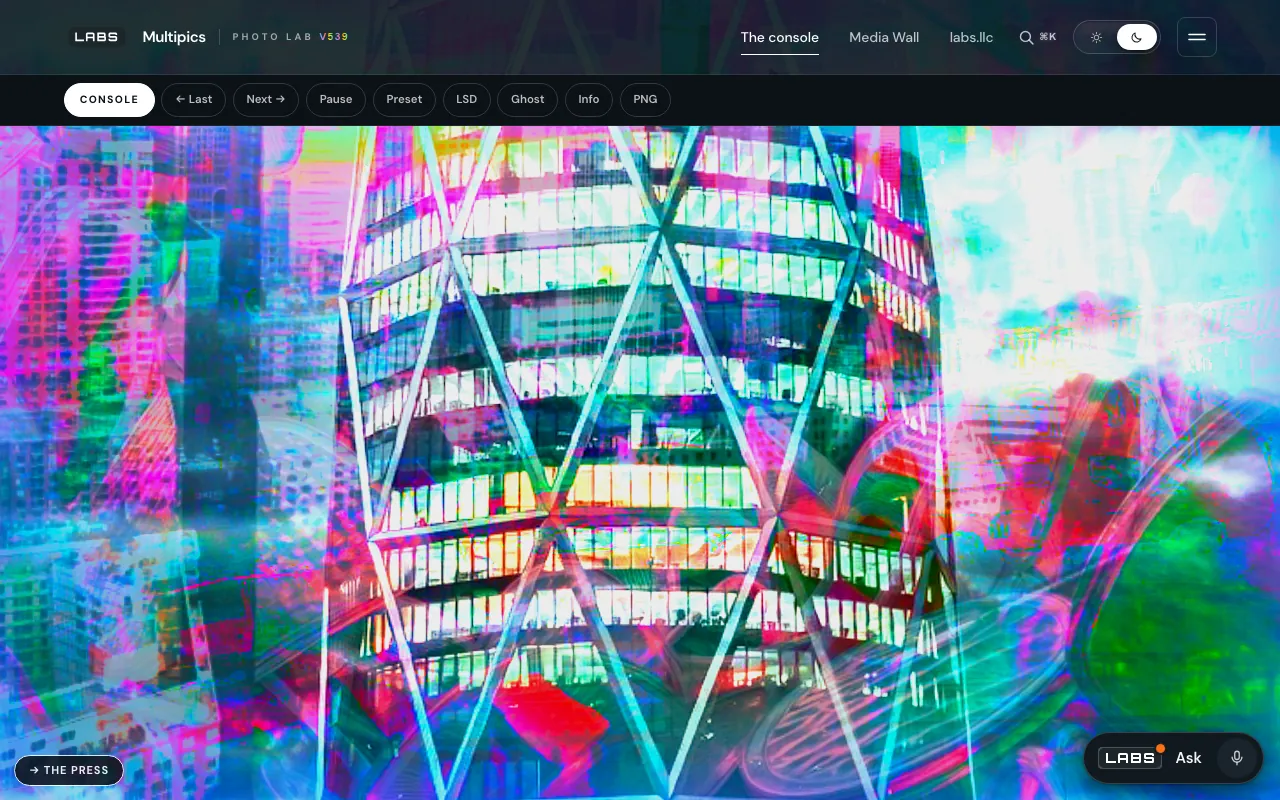
Multipics is a generative photo-blend console. It stacks two to eight photographs at a time using CSS blend modes, with per-layer opacity, scale, rotation, blur and hue; cycles through sixteen artistic presets on a timer; takes your own images or a whole folder; and exports the current composition as a high-resolution PNG.
It is for people who want striking collage and double-exposure images without learning a layer editor: artists, social posters, anyone who enjoys a happy accident.
02How it works
Everything runs in the browser, in one document (multi/multi.php). A bundled list of 117 photographs (multi.php:1143) is stacked in an isolated layer stack using fifteen blend modes, from overlay and multiply to hue and luminosity (multi.php:1226-1230). Each of the sixteen presets, among them CINEMATIC, VHS COLLAGE, GLITCH ART and KALEIDOSCOPE, is written as a character rather than a recipe: a weighted pool of modes plus ranges for layer count, opacity, scale, rotation and per-layer effects (multi.php:1232-1281).
Your own images become local object URLs, a folder opens through the File System Access API, and nothing is uploaded (multi.php:2212-2219, 2532-2546). The PNG export redraws the same layers into an offscreen canvas at up to four times the viewport, scaling blur and shadow lengths to match, and steps down until the buffer fits in about 256 MB (multi.php:2125-2150).
03The test
On 27 September 2026 we fetched the console from the local copy and counted its parts in the source. The 117 photographs are not in the local tree, because the studio ships images separately, so no composition could be rendered locally; the exhibit above was therefore taken from the public page, where the photographs are served. This test is thinner than the others, and the Proof bar says so.
| UTC | What we did | What came back |
|---|---|---|
| 20:00:17Z | The console on the local copy | HTTP 200, 152,688 bytes: the whole console in one document. |
| 20:00:17Z | The bare /multi/ address | 404 locally; the live site redirects it to multi.php with a rule the local server does not run. |
| 20:00:18Z | A bundled photograph | 404 locally: images are not in the local tree. |
| 20:02:30Z | Counts from the source | 117 photographs, 15 blend modes, 16 presets; layer ranges from 2–4 up to 4–8. |
04The comparison
Photopea
fetched 2026-09-27What it is
A browser-based raster and vector editor in the Photoshop mould that, by its own account, runs on your device without uploading files.
What it does better
Full manual control (layers, masks, layer styles and adjustments, with undo), and it opens and saves PSD, XCF and Sketch files at the source images' resolution and bit depth.
Where Multipics goes further
No skill required: sixteen presets generate complete multi-layer compositions on a timer, which a manual editor leaves to you (multi.php:1232-1281), from a bundled library of 117 photographs ready from the first second (multi.php:1143).
Pixlr Editor
fetched 2026-09-27What it is
An online photo editor with layers, the same family of blend modes, filters, AI tools and a subscription tier.
What it does better
Manual layer editing, masks, AI tools such as generative fill, and its own document format for returning to a composition later.
Where Multipics goes further
Automatic, continuously changing compositions from weighted presets instead of one hand-built image, with uploads kept local as object URLs (multi.php:1189-1191, 2212-2219).
Mosh-Pro (formerly PhotoMosh)
fetched 2026-09-27What it is
A real-time visual effects mixer for images, video and webcam, with a desktop app and a free web version.
What it does better
Video, GIF and webcam in and out, more than sixty effects, and seeded randomisation of effects.
Where Multipics goes further
Multipics blends several photographs together, two to eight layers per preset, rather than distorting one source (multi.php:1236-1255), and there is nothing to install.
05Where it falls short
- No direct control of layers. You cannot choose which photograph sits where, move or mask it, or undo; the composition is generated.
- PNG only, sized from the browser window (up to four times), not from the photographs' own resolution.
- Uploads over 12 MB are skipped (
multi.php:2216, 2221), and the folder picker needs a browser that supports showDirectoryPicker (multi.php:2532). - No video, GIF or webcam input or output.
- We could not watch it work. With no photographs in our copy, what the presets actually produce went unmeasured.
06The ruling
Multipics goes to lengths so that the reader does not have to. The presets are written as tendencies rather than fixed recipes, so the console composes finished images by itself, and the export works to match the screen at up to four times its size without breaking Safari's canvas limits. Your own pictures never leave the browser.
It has the lowest Proof and Candour bars on the bench, because our copy could not show a single blend and we found no stated limits. For a quick, striking composite it asks no skill at all; for a picture you mean to control, open Photopea or Pixlr.
On the docket: 13 of 20 checks met. Sixteen presets compose finished blends on their own; no layer control, no undo, PNG only.